Best Modem Router Combo 2026
Quick verdict
| Pick | Best for | DOCSIS | Wi-Fi | Price |
|---|---|---|---|---|
| NETGEAR Nighthawk CAX30 | Most households — Xfinity, Spectrum*, Cox | 3.1 | Wi-Fi 6 (AX2700) | ~$250 |
| ARRIS SURFboard SBG8300 | Budget buyers on plans up to 1 Gbps | 3.1 | Wi-Fi 5 (AC2350) | ~$160 |
| ARRIS G34 | Multi-device homes, plans up to 2.5 Gbps | 3.1 | Wi-Fi 6 (AX3000) | ~$230 |
| Motorola MG8702 | Value-focused users who still want AC3200 | 3.1 | Wi-Fi 5 (AC3200) | ~$180 |
| NETGEAR CAX80 | Multi-gig cable plans (2 Gbps+) | 3.1 | Wi-Fi 6 (AX6000) | ~$320 |
*Spectrum includes a free modem — a combo is only cost-effective for Spectrum if you’re currently renting both their modem and router.
Prices compiled from Amazon.com and manufacturer pages as of April 2026.
For Xfinity, Cox, or Optimum subscribers: buying your own modem router combo eliminates a $14–$15/month rental fee that costs $180/year and over $500 in three years. The right DOCSIS 3.1 combo pays for itself in under 10 months.
For Spectrum subscribers: stop reading about combos. Spectrum provides a modem for free. What you’re actually paying to rent is the Wi-Fi router — which means buying a standalone router (not a combo) is the move that saves you money.
That distinction — which ISP you have changes whether a combo even makes sense — is missing from every guide currently ranking for this keyword. Here’s what the rest of the article covers: five combos for cable ISP subscribers, the one technical spec you must verify before buying anything, and why every DOCSIS 3.0 product from 2020 is now a liability.
Table of Contents
Why DOCSIS 3.0 is a dead end in 2026
The 2020 version of this guide recommended DOCSIS 3.0 products — the ARRIS SURFboard AC1600, Motorola MG7550, NETGEAR Nighthawk C7000. Those devices are no longer appropriate purchases for a new home network in 2026, for three specific reasons:
ISPs are phasing DOCSIS 3.0 out. Many internet providers will no longer allow you to activate a “new” DOCSIS 3.0 cable modem on their network. Xfinity, Spectrum, and Cox have been progressively tightening activation requirements. Buying a DOCSIS 3.0 device today risks receiving a deactivation notice within months.
Speed bottlenecks on plans you already have. Even if your plan is only 200 Mbps, a DOCSIS 3.1 modem provides a more stable connection with lower latency than an aging one with DOCSIS 3.0. The protocol improvements in DOCSIS 3.1 — OFDM channel bonding, improved upstream bandwidth — produce measurably cleaner connections at any speed tier.
The price gap barely exists. DOCSIS 3.1 devices are only $20–$50 more than DOCSIS 3.0 equivalents and will support faster plans if you upgrade later. Given that you will likely keep the device for 5+ years, the small premium for future-proofing is worthwhile.
DOCSIS 4.0 is the next generation after 3.1, offering multi-gigabit symmetrical speeds and better upstream performance. As of April 2026, very few consumer devices support it and no major ISP has announced a broad residential rollout. It is not worth waiting for unless your ISP has announced specific DOCSIS 4.0 rollout plans in your area. DOCSIS 3.1 is the correct specification for any new purchase.
The one thing you must check before buying
Every modem — combo or standalone — must be on your ISP’s approved device list before you buy it. This isn’t optional. Using an unapproved modem can result in activation failure, degraded performance, or a support department that refuses to help you troubleshoot.
How to verify:
- Xfinity (Comcast): Xfinity’s official approved modem list is the authoritative source. Every device on this guide has been verified against it as of April 2026, but check it again before you buy — lists change.
- Spectrum: Spectrum publishes a compatible device list at Spectrum’s customer support pages. Note: Spectrum provides a modem for free, so the relevant question for Spectrum customers is whether they want to pay for their own router (not combo).
- Cox: Cox maintains an approved modem list at Cox’s equipment pages.
- Other ISPs: Contact the ISP directly or search “[ISP name] approved modem list” — most publish one.
The ISP savings calculation, done honestly
Xfinity: The xFi Gateway rental runs $14–$15/month, embedded in plan pricing. At $180/year, the NETGEAR Nighthawk CAX30 at approximately $250 breaks even in 16–17 months. After that, you save $180/year for the life of the device. Over five years: ~$650 in savings.
Cox: Equipment rental varies by plan tier, typically $10–$14/month. A mid-tier combo like the ARRIS SURFboard SBG8300 at approximately $160 breaks even in 12–16 months.
Spectrum: Spectrum includes a modem at no charge. Spectrum does not charge a modem rental fee — they include a modem for free. If you’re renting Spectrum’s router separately, buying a standalone Wi-Fi 6 or Wi-Fi 7 router (not a combo) is the savings move. A full combo doesn’t help if you’re discarding a free modem.
Optimum, Mediacom, and smaller ISPs: These ISPs generally charge $8–$12/month for equipment rental. Verify current pricing before calculating your break-even point.
The five best modem router combos in 2026
1. NETGEAR Nighthawk CAX30 — Best overall
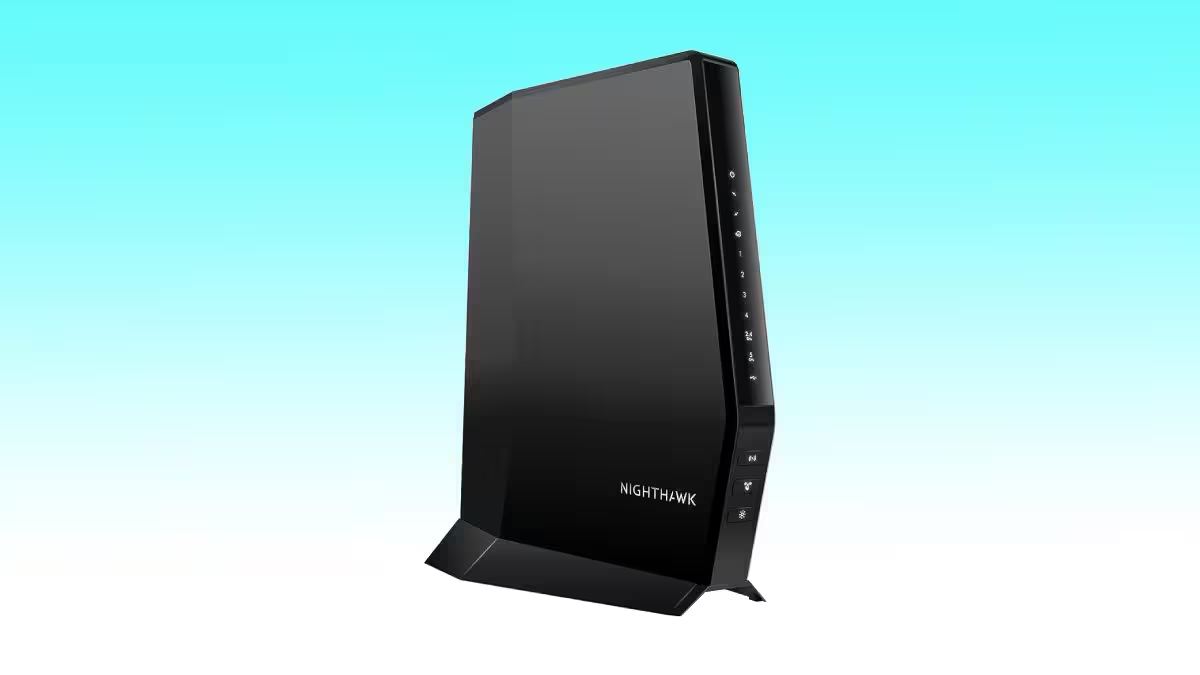
The NETGEAR Nighthawk CAX30 is the right answer for the majority of cable internet subscribers in 2026. DOCSIS 3.1 with 24×8 channel bonding, Wi-Fi 6 dual-band (AX2700, 2.4 GHz + 5 GHz), four Gigabit Ethernet ports, a USB 3.0 port, and compatibility with Xfinity, Spectrum, and Cox. It handles plans up to approximately 2 Gbps on the modem side and delivers consistent Wi-Fi 6 performance for up to 25–30 active devices.
The Nighthawk app provides remote management of connected devices, parental controls, and traffic monitoring — all without a browser admin interface. Setup is guided through the app: connect to the coaxial cable from the wall, plug in power, scan a QR code, and the app walks through ISP activation in under 10 minutes.
Wi-Fi 6’s practical advantage in a home network isn’t raw speed — it’s OFDMA (Orthogonal Frequency Division Multiple Access), which allows the router to communicate with multiple devices simultaneously rather than sequentially. In a household with 15+ devices all active at once — phones, laptops, smart TVs, thermostats, security cameras — Wi-Fi 6 handles congestion more gracefully than Wi-Fi 5.
What the marketing doesn’t mention: The CAX30’s 2.4 GHz band tops out at 800 Mbps and the 5 GHz band at 1,200 Mbps — solid for most households, but not the device for a 40-device smart home or a professional streaming setup. Users with more than 30 active devices simultaneously, or those on multi-gig plans who want the best wireless throughput on every band, should look at the CAX80.
Who should skip it: Xfinity Gigabit Pro or 2 Gbps plan subscribers who want to max their wireless throughput (step up to the CAX80). Anyone on a plan under 200 Mbps where the ARRIS SBG8300 saves $90 for identical real-world performance.
2. ARRIS SURFboard SBG8300 — Best budget pick
The ARRIS SURFboard SBG8300 is the replacement recommendation for anyone who bought the original SURFboard AC1600 or AC1900 from this guide in 2020. DOCSIS 3.1, Wi-Fi 5 (AC2350, dual-band), four Gigabit Ethernet ports, and compatibility with Xfinity, Spectrum, Cox, and most other cable providers. It handles plans up to 1 Gbps cleanly.
At approximately $160, it’s $90 less than the CAX30. For households on plans up to 500 Mbps with under 15 active devices, that $90 buys nothing. Wi-Fi 5 handles 1 Gbps plan speeds to connected devices without bottleneck; the lack of Wi-Fi 6’s OFDMA only matters at higher device counts and higher simultaneous load.
The SBG8300 has been a reliable workhorse for years. It supports plans up to 1 Gbps, has four Gigabit Ethernet ports, and works with Xfinity, Spectrum, Cox, and most other cable ISPs. ARRIS has a 10-year history of reliable firmware support on SURFboard models, which matters more than the spec sheet for a device that lives on a shelf for five years.
What the marketing doesn’t mention: Wi-Fi 5 doesn’t support WPA3 security natively on older SBG8300 firmware revisions — check the current firmware version before purchase. The 2.4 GHz performance is also notably weaker than the 5 GHz band on this device, which causes issues in older homes where thick walls force some devices onto 2.4 GHz. If that describes your house, the extra $90 for the CAX30’s stronger 2.4 GHz radio is worth it.
Who should skip it: Households on plans above 1 Gbps. Anyone with 20+ simultaneous devices. New construction or renovated homes with Wi-Fi 6 or Wi-Fi 7 client devices that will benefit from the protocol improvements.
3. ARRIS G34 — Best for multi-device households
The ARRIS G34 closes the gap between value combos and the premium CAX80. DOCSIS 3.1, Wi-Fi 6 (AX3000, dual-band), four Gigabit Ethernet ports, and support for plans up to 2.5 Gbps. The AX3000 Wi-Fi 6 radio is more capable than the SBG8300’s Wi-Fi 5 at high device counts and delivers better 2.4 GHz performance for smart home and IoT devices.
The ARRIS G34 combines powerful internet and wireless capabilities, supporting plans up to 2.5 Gbps and delivering Wi-Fi 6 speeds up to 3 Gbps across dual bands. Owning this modem can save monthly rental fees, and multiple Gigabit Ethernet ports with broad support for major US cable providers make it a reliable, future-ready choice.
For a family of four with two streaming TVs, three laptops, multiple phones, smart home devices, and a gaming console — all on at Roughly the same time in the evening — the G34’s Wi-Fi 6 OFDMA handles the simultaneous load noticeably better than the SBG8300’s Wi-Fi 5.
What the marketing doesn’t mention: The G34 is only approved for Comcast Xfinity and Cox as of April 2026 — Spectrum compatibility is unconfirmed on this model. Verify on Spectrum’s approved device list before purchasing. For confirmed Spectrum compatibility, the Nighthawk CAX30 is the safer choice.
Who should skip it: Spectrum customers (verify compatibility first). Anyone on a plan under 500 Mbps who doesn’t need the AX3000 upgrade over the SBG8300.
4. Motorola MG8702 — Best value with AC3200
The Motorola MG8702 slots between the SBG8300 and the G34 on price and performance. DOCSIS 3.1, Wi-Fi 5 (AC3200, tri-band: one 2.4 GHz + two 5 GHz bands), four Gigabit Ethernet ports, compatible with Xfinity, Cox, and Charter Spectrum.
The tri-band AC3200 configuration is the reason to choose this over the SBG8300. Two 5 GHz bands allow the router to dedicate one band to high-performance devices (gaming consoles, streaming sticks, laptops) and one to medium-traffic devices (phones, tablets), reducing band congestion in busy households without the Wi-Fi 6 upgrade cost.
The Motorola MG8702 delivers ultra-fast, reliable internet with DOCSIS 3.1 technology and an AC3200 Wi-Fi router. It’s compatible with major providers like Comcast Xfinity, Cox, and Charter Spectrum. The built-in router offers strong, stable Wi-Fi coverage with Power Boost, Range Boost, and Beamforming. Motorola’s app simplifies management, security, and monitoring.
What the marketing doesn’t mention: AC3200 tri-band is a Wi-Fi 5 configuration. While the three bands help with congestion management, it doesn’t bring Wi-Fi 6’s OFDMA efficiency. For the same price bracket, the ARRIS G34’s Wi-Fi 6 dual-band is a technically superior solution for the same device-density use case. The MG8702’s advantage is its tri-band for households where band segregation — separating device types across bands — is how you manage the network.
Who should skip it: Anyone who prioritizes Wi-Fi protocol generation over band count. Users on multi-gig plans (the Gigabit Ethernet ports cap wired throughput to 1 Gbps; a 2 Gbps plan needs a combo with a 2.5 GbE or higher LAN port).
5. NETGEAR CAX80 — Best for multi-gig cable plans
The NETGEAR CAX80 is the combo for Xfinity Gigabit Pro, Xfinity 2 Gbps, or Cox Gigablast plan subscribers who want maximum wireless performance without splitting into a separate modem-plus-router setup. DOCSIS 3.1 with 32×8 channel bonding, Wi-Fi 6 AX6000 (tri-band: 2.4 GHz + dual 5 GHz), a 2.5 GbE Ethernet port for multi-gig wired connections, four Gigabit LAN ports, two USB 3.0 ports, and compatibility with Xfinity and Cox.
The AX6000 Wi-Fi 6 tri-band radio is the most powerful integrated wireless system in any current modem-router combo. Close-range performance on the 5 GHz band reaches 4.8 Gbps aggregate, which is overkill for almost any current ISP plan but positions the device for the next five years of plan upgrades without requiring a hardware swap.
At approximately $320, the payback on Xfinity’s $14–$15/month rental is still under two years — $320 ÷ $180/year = 1.8 years. After that, $180/year of savings, indefinitely.
What the marketing doesn’t mention: The CAX80’s 2.5 GbE LAN port is the WAN port for a wired multi-gig connection to a downstream device. Most households have nothing that uses 2.5 GbE, making this specification irrelevant to them. Additionally, the CAX80 is currently only certified for Xfinity and Cox — not Spectrum. Spectrum customers should use the Nighthawk CAX30 for confirmed compatibility.
Who should skip it: Spectrum subscribers (not on their approved list). Anyone on a plan under 1 Gbps — you’re paying for Wi-Fi 6 AX6000 performance you can’t access. The CAX30 gets you 85% of the performance at 78% of the price.
Combo vs. separate: the 2026 verdict
The original version of this guide pushed combos for everyone. In 2026, the right answer is more nuanced.
Buy a combo if: You want a single device that’s simple to set up and support, you’re on a plan up to 1 Gbps, and you don’t need to upgrade your Wi-Fi generation independently of your modem. Combos reduce cable clutter and involve one fewer device to troubleshoot.
Buy a separate modem + router if: You’re on a multi-gig plan and want a Wi-Fi 7 router (no mainstream modem-router combo offers Wi-Fi 7 as of April 2026), you want to upgrade your Wi-Fi without replacing the modem, or you already have a high-performance router you’re happy with. A standalone DOCSIS 3.1 modem like the ARRIS SB8200 or Motorola MB8611 (~$130–$170) paired with a Wi-Fi 7 router gives you better wireless performance than any current combo at comparable or lower combined cost.
The tipping point in 2026: if you’re on a Gigabit+ plan and care about Wi-Fi 7 performance, the separate path wins. If you want simplicity and are on a plan under 1 Gbps, a combo is the correct choice.
Frequently asked questions
Do I need a modem router combo for cable internet?
You need a DOCSIS cable modem — a device that connects to the coaxial cable from your wall and gives your home an internet connection. You need a router — a device that creates a Wi-Fi network and distributes the internet connection to multiple devices. A modem-router combo is a single device that handles both functions. It’s an option, not a requirement. You can also use a standalone modem plus a separate router, which gives you more flexibility to upgrade each component independently.
Will any modem router combo work with my ISP?
No. Cable ISPs maintain approved device lists, and only certified devices can be activated on their network. Using an unapproved modem typically results in activation failure or degraded performance. Always check your specific ISP’s approved modem list before purchasing. Xfinity’s and Cox’s compatibility lists are the most detailed; Spectrum’s is more limited because they provide a modem for free and focus primarily on router compatibility.
Is DOCSIS 3.0 still acceptable in 2026?
No. DOCSIS 3.0 devices are being phased out by Xfinity, Spectrum, Cox, and other major cable ISPs. Many providers no longer allow new DOCSIS 3.0 device activations. Buying a DOCSIS 3.0 device in 2026 risks receiving a deactivation notice and is a poor value relative to DOCSIS 3.1 alternatives that cost only $20–$50 more.
What is DOCSIS 3.1 and why does it matter?
DOCSIS (Data Over Cable Service Interface Specification) is the standard that governs how cable modems communicate with ISP networks. Version 3.1 introduced OFDM channel bonding — a more efficient way of using the cable spectrum — which enables multi-gigabit speeds, lower latency, and better upload performance than DOCSIS 3.0. All five picks in this guide use DOCSIS 3.1. As of 2026, it is the minimum specification for any new cable modem purchase.
Does Spectrum require you to buy your own modem?
No. Spectrum provides a modem at no extra charge as part of your internet plan. If you’re considering a modem-router combo specifically to stop paying Spectrum equipment fees, the only equipment rental you’d be eliminating is the Wi-Fi router — which means a standalone router (not a combo) is the correct purchase for Spectrum customers. A full combo doesn’t save money if you’re replacing a free modem with a purchased one.
Should I buy a modem router combo or separate devices?
For most households on plans up to 1 Gbps: a combo is simpler, less cluttered, and cost-effective. For households on multi-gig plans who want Wi-Fi 7 wireless performance: a standalone DOCSIS 3.1 modem paired with a Wi-Fi 7 router delivers better performance because no current mainstream combo offers Wi-Fi 7. The separate path also lets you upgrade either component independently — when Wi-Fi 8 arrives, you upgrade the router without touching the modem.