



Last Updated: November 2025 | Historical Documentation Archive
ABS (Acrylonitrile Butadiene Styrene) coloured filaments represented the professional-grade material choice in the Bits From Bytes catalog, offering superior mechanical properties, heat resistance, and vibrant color options for demanding applications. Between 2007 and 2012, these materials enabled the production of functional prototypes, engineering parts, and durable end-use products across industries.
The coloured ABS range combined the strength and durability advantages of industrial-grade thermoplastics with aesthetic versatility, making them the preferred choice for professional users requiring both performance and presentation quality in their printed parts.
Understanding ABS Colored Filaments
Material Composition and Properties
ABS (Acrylonitrile Butadiene Styrene) is a petroleum-based thermoplastic composed of three monomers: acrylonitrile (chemical resistance), butadiene (toughness and impact resistance), and styrene (processability and surface finish). The coloured variants incorporated pigments throughout the polymer matrix, ensuring consistent color saturation through the entire part thickness.
Core Properties:
- Tensile Strength: 40-45 MPa (higher than PLA)
- Impact Resistance: Excellent (superior to most other 3D printing materials)
- Heat Resistance: Glass transition ~105°C (can withstand higher temperatures than PLA)
- Chemical Resistance: Good resistance to oils, mild acids, and bases
- Layer Adhesion: Excellent when properly calibrated
Historical Context: ABS was chosen by Bits From Bytes for its proven track record in injection molding and its reputation as an engineering-grade material. The same polymer used in LEGO bricks, automotive components, and professional prototypes was now accessible to desktop 3D printer users.
Color Range and Applications
Available Colors (2007-2012 Catalog):
Primary Colors:
- Red ABS – Most popular for automotive prototypes and consumer products
- Blue ABS – Preferred for mechanical assemblies and engineering parts
- Yellow ABS – High visibility applications and safety equipment prototypes
Secondary Colors:
- Green ABS – Medical device prototypes and eco-friendly product development
- Black ABS – Professional finishes, electronic housings, and final products
- White ABS – Clean aesthetic for consumer electronics and medical applications
Special Colors:
- Orange ABS – Safety equipment and high-visibility prototypes
- Purple ABS – Branding applications and custom consumer products
- Grey ABS – Professional prototypes mimicking production materials
Each color variant maintained identical mechanical properties while offering aesthetic options that eliminated post-processing paint requirements for many applications.
Technical Specifications
Print Parameters (Optimal Settings)
Extrusion Temperature:
- Minimum: 220°C
- Optimal: 230-240°C
- Maximum: 250°C
- Note: Higher temperatures improve layer adhesion but increase warping risk
Bed Temperature:
- Minimum: 90°C (warping likely below this)
- Optimal: 100-110°C
- Maximum: 120°C
- Critical: Heated bed mandatory for ABS printing
Print Speed:
- First Layer: 20-30mm/s (crucial for adhesion)
- Perimeters: 40-50mm/s
- Infill: 60-80mm/s
- Travel: 150-200mm/s
Cooling:
- Part Cooling: OFF or minimal (5-10%) for ABS
- Excessive cooling causes: Layer delamination, warping, cracking
- Exception: Overhangs may benefit from brief cooling bursts
Retraction:
- Distance: 2-4mm (direct drive) / 4-6mm (Bowden)
- Speed: 40-60mm/s
- Purpose: Minimize stringing without compromising extrusion
Environmental Requirements
Ambient Temperature:
- Minimum: 18°C (68°F)
- Optimal: 22-26°C (72-79°F)
- Enclosed Build Volume: Highly recommended for large prints
Ventilation:
- Required: ABS emits styrene fumes during printing
- Recommendation: Well-ventilated area or fume extraction system
- Safety Note: Not suitable for poorly ventilated home environments without proper ventilation
Humidity:
- Storage: Below 20% relative humidity
- Maximum printing environment: 50% RH
- Hygroscopic: ABS absorbs moisture, causing bubble defects and poor layer adhesion
Filament Specifications
Diameter:
- Nominal: 3.0mm (RapMan 3.1, 3DTouch)
- Tolerance: ±0.05mm
- Critical: Consistent diameter essential for reliable extrusion
Spool Weight:
- Standard: 500g per spool
- Large format: 1kg spools (professional users)
- Coverage: Approximately 100-120 meters per 500g spool
Density:
- 1.04-1.07 g/cm³
- Weight estimation: 1.05g per meter of 3mm filament
Printing Best Practices
Surface Preparation and Adhesion
Heated Bed Surface Options:
1. Kapton Tape (Polyimide):
- Application: Clean surface with isopropyl alcohol, apply tape smoothly
- Advantages: High temperature resistance, good adhesion, reusable
- Maintenance: Replace when surface becomes scratched or contaminated
- Cost: Moderate (tape needs periodic replacement)
2. ABS Juice (Slurry):
- Recipe: Dissolve ABS scraps in acetone (10:1 acetone:ABS ratio)
- Application: Brush thin layer on heated bed, let dry before printing
- Advantages: Excellent adhesion, prevents warping, very cost-effective
- Duration: Lasts 5-10 prints before reapplication needed
3. PEI Sheet:
- Application: Adhere PEI sheet to heated bed, clean with isopropyl alcohol
- Advantages: Excellent adhesion, long-lasting, easy part removal when cooled
- Maintenance: Clean regularly, replace after hundreds of prints
- Cost: Higher initial investment, minimal ongoing costs
4. Hairspray:
- Application: Light coating on heated glass bed
- Advantages: Inexpensive, widely available, easy to apply
- Drawbacks: Messy, requires frequent reapplication, inconsistent results
Temperature Management
Preventing Warping:
Corner Warping (Most Common):
- Cause: Temperature differential between heated bed and ambient air
- Solution: Increase bed temperature to 110°C, use enclosure
- Advanced: Add brim (5-10mm) for large flat parts
Edge Lifting:
- Cause: Rapid cooling of printed material
- Solution: Eliminate part cooling fan, increase ambient temperature
- Alternative: Print with raft for problematic geometries
Entire Part Delamination:
- Cause: Insufficient bed adhesion or severe temperature gradient
- Solution: Ensure first layer properly squished, verify bed level, add brim
Layer Separation:
- Cause: Insufficient extrusion temperature or excessive cooling
- Solution: Increase nozzle temperature by 5-10°C, disable part cooling
- Verification: Printed parts should show no visible gaps between layers
Post-Processing Techniques
Acetone Vapor Smoothing:
Process:
- Place printed part in enclosed container
- Add small amount of acetone (do not submerge part)
- Heat acetone to produce vapor (hot water bath method safest)
- Expose part for 30 seconds to 5 minutes (depends on desired smoothness)
- Remove part and allow to air dry
Results:
- Eliminates layer lines completely
- Creates glossy, injection-molded appearance
- Slightly reduces dimensional accuracy (0.1-0.3mm)
- Fuses layers, increasing strength
Safety:
- Perform in well-ventilated area
- Acetone is highly flammable
- Avoid skin contact and inhalation
- Not recommended for home use without proper safety equipment
Mechanical Finishing:
Sanding:
- Start: 120-grit sandpaper (removes major layer lines)
- Progress: 220, 400, 600, 1000 grit (increasingly smooth finish)
- Technique: Sand in direction perpendicular to layer lines
- Duration: 5-30 minutes depending on part size and desired finish
Filling:
- Product: Automotive body filler or epoxy putty
- Application: Fill large gaps, sand smooth after curing
- Use case: Preparing parts for painting or final finishing
Painting:
- Primer: Spray primer formulated for plastics
- Paint: Acrylic or enamel paints adhere well to ABS
- Finish: Clear coat for durability and UV protection
Material Advantages
Mechanical Performance
Impact Resistance: ABS colored materials excelled in applications requiring toughness and the ability to withstand sudden forces without brittle failure. Unlike PLA which tends to crack under impact, ABS deforms slightly before breaking, making it suitable for:
- Functional prototypes subject to drop testing
- Mechanical assemblies with snap-fit connections
- Protective cases and housings
- Toy prototypes and educational manipulatives
Fatigue Resistance: Parts printed in ABS demonstrated superior performance under repeated stress cycles compared to PLA alternatives. This made colored ABS the material of choice for:
- Living hinges and flexible connections
- Gear teeth and mechanical linkages
- Clips and fasteners requiring repeated use
- Functional prototypes undergoing life testing
Heat Resistance: With a glass transition temperature around 105°C, ABS colored parts maintained dimensional stability in environments that would deform PLA:
- Automotive interior prototypes (dashboard exposure)
- Appliance components near heat sources
- Electronics housings with heat-generating components
- Industrial applications with elevated ambient temperatures
Chemical Resistance
Resistant To:
- Weak acids and bases
- Aliphatic hydrocarbons (gasoline, diesel)
- Vegetable oils and animal fats
- Alcohols (ethanol, isopropanol)
Susceptible To:
- Strong acids (sulfuric, nitric)
- Chlorinated solvents (dichloromethane)
- Ketones (acetone – used for smoothing)
- Aromatic hydrocarbons (benzene, toluene)
This chemical resistance profile made colored ABS suitable for prototypes exposed to common industrial and consumer chemicals, though material compatibility testing was always recommended for mission-critical applications.
Common Challenges and Solutions
Warping and Shrinkage
Problem: Corner lifting, edge curling, or entire part detachment during printing.
Causes:
- Insufficient bed adhesion
- Excessive temperature differential between bed and ambient
- Inadequate first layer squish
- Insufficient bed temperature
Solutions by Severity:
Minor Warping (corners lifting slightly):
- Increase bed temperature to 110°C
- Add 5-10mm brim in slicer settings
- Ensure room temperature above 20°C
- Verify first layer squish (paper test – slight resistance)
Moderate Warping (edges curling noticeably):
- Apply enclosure or draft shields around printer
- Use ABS juice for enhanced adhesion
- Disable all part cooling fans
- Consider adding raft for large flat parts
Severe Warping (part completely detaching):
- Verify bed level across entire surface
- Increase first layer extrusion multiplier to 110%
- Reduce print speed for first layer to 20mm/s
- Consider alternative bed surface (PEI sheet)
- Increase bed temperature to 115-120°C
Stringing and Oozing
Problem: Fine plastic threads between printed parts or excessive material accumulation.
Causes:
- Insufficient retraction
- Nozzle temperature too high
- Slow travel moves
- Moisture-contaminated filament
Solutions:
- Increase retraction distance by 0.5mm increments (test 2-6mm range)
- Reduce nozzle temperature by 5°C (test 230-240°C range)
- Increase travel speed to 150-200mm/s
- Dry filament in food dehydrator at 60°C for 4 hours
- Enable “Z-hop” for travel moves (0.2-0.4mm)
Layer Adhesion Issues
Problem: Layers separating or delaminating during or after printing.
Causes:
- Nozzle temperature insufficient
- Excessive part cooling
- Contaminated filament
- Under-extrusion
Solutions:
- Increase nozzle temperature to 240-250°C
- Completely disable part cooling fan
- Verify filament diameter consistency (should be 3.0mm ±0.05mm)
- Increase extrusion multiplier by 2-5% in slicer
- Reduce print speed to allow better heat transfer between layers
- Add enclosure to maintain elevated ambient temperature
Surface Quality Defects
Problem: Visible layer lines, rough surface finish, or inconsistent appearance.
Solutions:
Reducing Layer Lines:
- Decrease layer height (0.2mm → 0.15mm or 0.1mm)
- Optimize nozzle temperature (usually 235-240°C sweet spot)
- Slow down perimeter speeds (40-45mm/s)
- Ensure proper cooling balance (5-10% for small features)
Improving Surface Finish:
- Print in “vase mode” for hollow objects (single perimeter, spiraling)
- Increase perimeter count (2 → 3 or 4 perimeters)
- Enable “ironing” for top surfaces (if supported by slicer)
- Post-process with acetone vapor smoothing
Color-Specific Considerations
Red ABS
Characteristics:
- Most popular color for consumer products and automotive applications
- Slight tendency toward higher temperature requirements (235-245°C optimal)
- Excellent visual inspection properties (defects easily visible)
Best Uses:
- Automotive interior prototypes
- Consumer electronics housings
- Branding and marketing models
- Medical device prototypes requiring high visibility
Printing Notes:
- May require slightly higher bed temperature (110°C) for optimal adhesion
- Red pigments can show layer lines more prominently than darker colors
Blue ABS
Characteristics:
- Popular for mechanical and engineering applications
- Consistent printing properties across batches
- Good color stability (minimal fading under UV exposure)
Best Uses:
- Mechanical assemblies and functional prototypes
- Engineering testing and validation parts
- Educational models and demonstrations
- Replacement parts and tooling
Printing Notes:
- Generally forgiving material with wide temperature window
- Excellent for learning ABS printing techniques
Black ABS
Characteristics:
- Professional appearance suitable for final products
- Hides layer lines and surface imperfections effectively
- Slightly higher thermal absorption (may require temperature adjustments)
Best Uses:
- Electronics housings and enclosures
- Professional-grade prototypes
- Functional end-use parts
- Photographic and optical equipment
Printing Notes:
- Can tolerate slightly lower bed temperature (100-105°C) due to pigment thermal properties
- Excellent choice for parts requiring minimal post-processing
White ABS
Characteristics:
- Clean, professional aesthetic
- Requires higher pigment loading (can affect flow slightly)
- May yellow slightly with age or UV exposure
Best Uses:
- Medical device prototypes
- Consumer appliance housings
- Clean room applications
- Parts requiring painting or custom finishing
Printing Notes:
- May benefit from slightly increased extrusion temperature (240-245°C)
- More sensitive to contamination – ensure clean nozzle before use
Yellow, Green, Orange, Purple ABS
Characteristics:
- Vibrant colors requiring specialized pigments
- Generally consistent printing properties
- Color intensity can vary slightly between batches
Best Uses:
- Branding and marketing prototypes
- Safety equipment mockups (yellow, orange)
- Educational and demonstration models
- Custom consumer products
Printing Notes:
- Follow standard ABS printing parameters
- Store away from direct sunlight to prevent fading
Material Storage and Handling
Proper Storage Conditions
Temperature:
- Ideal: 15-25°C (59-77°F)
- Avoid: Direct sunlight, heat sources, temperature fluctuations
- Storage location: Climate-controlled interior space
Humidity:
- Target: Below 20% relative humidity
- Maximum: 40% RH (performance degradation above this)
- Solution: Desiccant packs, sealed containers with silica gel
Light Exposure:
- Minimize: UV exposure can degrade polymer and fade colors
- Storage: Opaque containers or sealed bags
- Long-term: Dark, cool storage area
Contamination Prevention:
- Keep spools sealed when not in use
- Avoid touching filament with bare hands (oils cause adhesion issues)
- Store away from dust and debris
Filament Drying
Signs of Moisture Contamination:
- Popping or crackling sounds during extrusion
- Excessive stringing or oozing
- Brittle prints with poor layer adhesion
- Steam or vapor visible at nozzle
- Rough, bubbled surface finish
Drying Methods:
Food Dehydrator (Recommended):
- Temperature: 60-70°C (140-158°F)
- Duration: 4-6 hours
- Placement: Spool on supports for air circulation
- Cost: $30-60 for suitable dehydrator
Oven Drying (Caution Required):
- Temperature: 60°C (140°F) maximum
- Duration: 3-4 hours
- Monitoring: Check every 30 minutes to prevent overheating
- Risk: Oven temperature accuracy critical (too hot melts filament)
Commercial Filament Dryer:
- Temperature: 65°C preset
- Duration: 4-6 hours
- Advantages: Designed specifically for filament, safe, consistent
- Cost: $40-100
Verification: Print a test cube after drying – should show no popping sounds and smooth surface finish.
Comparison with Other Materials
ABS vs PLA Colored Materials
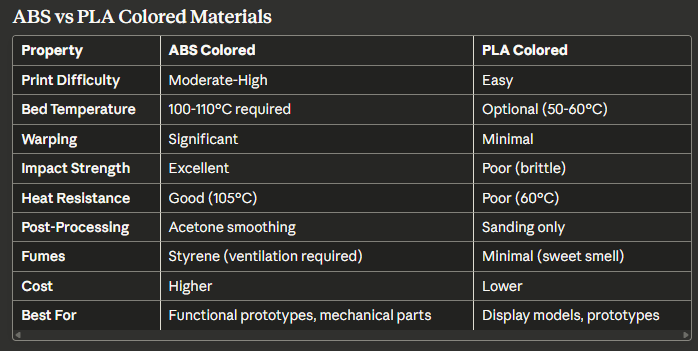
Decision Factors:
- Choose ABS Colored: Functional parts, mechanical testing, heat exposure, impact resistance
- Choose PLA Colored: Display models, educational use, ease of printing, minimal equipment
ABS vs ABS White
While mechanically identical, colored ABS offered several advantages over white:
Visual Advantages:
- Vibrant colors eliminated painting requirements
- Easier defect detection during quality inspection
- Better color consistency across print batches
- Professional appearance without post-processing
Application-Specific:
- Colored ABS: Branding, marketing prototypes, consumer products
- White ABS: Medical applications, appliance housings, neutral base for painting
The choice between colored and white ABS was primarily aesthetic, with identical printing parameters and mechanical properties.
Historical Context and Legacy
Bits From Bytes Material Development (2007-2012)
Bits From Bytes’ introduction of colored ABS filaments represented a significant advancement in desktop 3D printing accessibility. Prior to 2007, most hobbyist 3D printing involved natural-color materials requiring extensive post-processing for professional presentations.
Key Innovations:
- Consistent color throughout part thickness (vs surface coating)
- Quality control ensuring dimensional consistency (±0.05mm tolerance)
- Wide color palette matching industrial injection molding options
- Documentation and support for optimal printing parameters
Market Impact: The availability of professional-grade colored ABS enabled:
- Small businesses to create product prototypes without outsourcing
- Educational institutions to produce engaging demonstration models
- Engineers to validate designs in final-product colors
- Makers to create functional, visually appealing projects
Evolution to Modern Materials
The formulations and knowledge developed for Bits From Bytes colored ABS materials directly influenced modern 3D printing filaments:
Technical Advancements:
- Improved pigment dispersion for color consistency
- Enhanced formulations reducing warping tendency
- Better diameter control (modern: ±0.02mm)
- Specialized variants (ABS+, ABS-X) with modified properties
Continued Relevance: The fundamental principles established during the 2007-2012 era remain valid:
- Heated bed requirement for ABS adhesion
- Optimal temperature ranges (230-240°C)
- Ventilation necessity for styrene fumes
- Acetone smoothing post-processing techniques
Modern colored ABS materials are evolutionary improvements rather than revolutionary changes, building upon the foundation established by pioneers like Bits From Bytes.
Frequently Asked Questions
Why does my ABS colored print warp even with a heated bed at 100°C?
Warping in ABS results from thermal contraction as the material cools. Even with a heated bed, the top layers cool faster than bottom layers, creating internal stresses. Solutions include increasing bed temperature to 110-115°C, adding a brim or raft for better adhesion, using an enclosure to maintain elevated ambient temperature, and applying ABS juice to the bed surface for enhanced adhesion.
Can I print ABS colored materials without an enclosure?
While possible, printing ABS without an enclosure significantly increases warping risk, especially for large prints. Small parts (under 50mm) can succeed without enclosure if bed adhesion is excellent and room temperature is warm (22-26°C). For larger parts, an enclosure or at least draft shields around the printer dramatically improve success rates.
Is it safe to print ABS colored materials at home?
ABS emits styrene fumes during printing, which can cause headaches, dizziness, and respiratory irritation with prolonged exposure. Home printing is safe only with adequate ventilation – either a well-ventilated room with open windows, a fume extraction system venting outdoors, or printing in a garage/workshop separate from living spaces. Never print ABS in a bedroom or poorly ventilated space.
How do I fix layer separation in my ABS colored prints?
Layer separation results from insufficient bonding between layers. Increase nozzle temperature to 240-245°C to ensure proper layer fusion. Completely disable part cooling fans, as ABS requires heat for optimal layer adhesion. Verify extrusion is adequate (increase flow rate by 2-5% if necessary). Add an enclosure to maintain elevated ambient temperature, preventing rapid cooling. If problems persist, check for moisture contamination and dry filament at 60-70°C for 4-6 hours.
Can I sand and paint ABS colored materials?
Yes, ABS accepts sanding and painting exceptionally well. Start with 120-grit sandpaper to remove major layer lines, progressively moving to 220, 400, and 600 grit for smooth finish. Apply plastic primer before painting for best adhesion. Acrylic and enamel paints work well on ABS. For professional results, consider acetone vapor smoothing before painting to eliminate all layer lines.
Why do some colors seem harder to print than others?
Different pigments can slightly affect material flow characteristics. Red and yellow pigments sometimes require 5-10°C higher extrusion temperatures due to pigment thermal properties. Black ABS may tolerate slightly lower bed temperatures due to increased thermal absorption. Generally, these differences are minor – if a specific color proves difficult, adjust temperature up or down by 5°C from standard settings.
How long can I store ABS colored filament?
Properly stored ABS (sealed container with desiccant, cool dark location) remains usable for 2-5 years. However, moisture absorption occurs gradually even in sealed containers, so periodic drying before use is recommended for filament stored over 6 months. Signs of degradation include brittleness, difficulty achieving layer adhesion, and excessive popping during extrusion. When in doubt, dry filament before use.
What’s the best bed surface for ABS colored materials?
PEI sheets offer the best combination of adhesion during printing and easy release when cooled. Kapton tape provides excellent heat resistance and good adhesion. ABS juice (ABS dissolved in acetone) on glass offers strong adhesion at low cost but requires reapplication every 5-10 prints. For beginners, Kapton tape provides most consistent results with least troubleshooting.
Related Materials and Resources
Material Guides:
- 3D Printing Materials Catalog – Complete materials overview
- PLA Material Solid Colours – Alternative easy-printing materials
- PLA Material Translucent – Translucent PLA options
- ABS Material White – White ABS filament
Printer Documentation:
- RapMan 3.1 3D Printer – Hardware optimized for ABS
- RapMan 3.2 Kit – Next generation capabilities
- Complete BfB Wiki Archive – Full historical documentation
Technical Resources:
- Skeinforge Guide – Slicing software optimization
- Skeinforge Infill Advanced Settings – Advanced parameter tuning
- G-Code Reference – Understanding print commands
- Teaching Resources – Educational applications
For questions about ABS colored materials, troubleshooting print issues, or sourcing compatible filament for vintage equipment, visit our main documentation hub.
This article preserves historical knowledge about Bits From Bytes colored ABS materials from 2007-2012. Modern safety standards and best practices should be applied when working with any thermoplastic materials. Material specifications represent period-accurate information and may not reflect current formulations or modern alternatives.
Last updated: November 2025 | Part of the Bits From Bytes Historical Documentation Project


