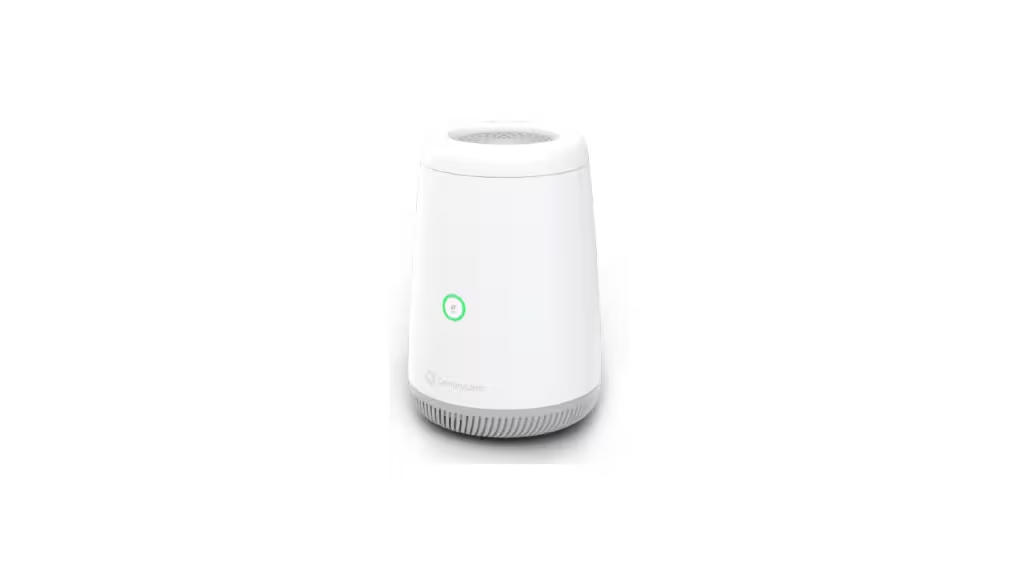
Best Modem for CenturyLink 2026
Step one — which service do you actually have?
Check your bill or log into your account. The service name matters:
| Service name on your bill | Connection type | What you need |
|---|---|---|
| Quantum Fiber | Fiber (FTTH) | No modem. SmartNID provided by ISP. Buy a Wi-Fi router. |
| CenturyLink Fiber Internet | Fiber (FTTH) | No modem. SmartNID provided by ISP. Buy a Wi-Fi router. |
| CenturyLink High-Speed Internet | DSL (VDSL2 or ADSL) | Buy a compatible DSL modem/gateway |
| CenturyLink Internet (older plans) | DSL | Buy a compatible DSL modem/gateway |
Quantum Fiber and CenturyLink are separate brands owned by Lumen. CenturyLink will eventually offer only DSL services, and Quantum will offer fiber internet plans. In practice, some addresses have already migrated to Quantum Fiber; others remain on legacy CenturyLink DSL. Your bill or the address lookup at quantumfiber.com confirms which applies to you.
The savings math for fiber customers:
| Router purchase | Monthly lease avoided | Break-even | 5-year savings |
|---|---|---|---|
| TP-Link Archer BE550 (~$150) | $15/mo | 10 months | ~$750 |
| ASUS RT-BE96U (~$450) | $15/mo | 30 months | ~$450 |
| eero Pro 7 (~$230) | $15/mo | 15 months | ~$670 |
Three things have changed since the 2020 version of this article, and all three change what you should buy:
One: CenturyLink is now two brands. Lumen Technologies — the parent company — split its residential internet into CenturyLink (DSL only) and Quantum Fiber (fiber only) in 2022. Which brand serves your address determines whether you need a modem at all.
Two: If you have fiber service, there is no modem to buy. Quantum Fiber and CenturyLink fiber installations use a SmartNID — a device the ISP installs and owns, similar to Verizon’s ONT. It doesn’t have Wi-Fi. What you need is a router. CenturyLink charges $15/month to lease theirs; buying your own saves that fee immediately.
Three: Every modem recommended in this article’s 2020 version is now officially unsupported. The Actiontec C1000A, Actiontec C2100T, Technicolor C2000T, and Zyxel C1100Z were all removed from CenturyLink’s approved modem list in November 2023, per ApprovedModemList.com’s change history. Buying any of them today puts you on hardware your ISP no longer supports.
The right answer in 2026 depends entirely on which service you have. Start here.
Table of Contents
If you have Quantum Fiber or CenturyLink Fiber — no modem, just a router
For CenturyLink fiber internet, the company provides a fiber-ready SmartNID that delivers the fiber connection into your home at no extra cost. The SmartNID does not have WiFi capabilities; you will need 360 WiFi or another WiFi solution.
The SmartNID is analogous to Verizon’s ONT — you cannot buy a replacement or alternative. It’s ISP equipment, always. What you plug into it is a router.
CenturyLink’s 360 WiFi (their managed mesh system) costs $15/month to lease. At $180/year, any decent Wi-Fi 6 or Wi-Fi 7 router pays for itself in under a year. You may use a mesh WiFi solution or router if it’s compliant with IEEE 802.11ax industry standards, which would be compatible with the Quantum Fiber modem.
For router recommendations for your fiber connection, see our best Wi-Fi 7 routers 2026 guide — the same logic applies as for any fiber ISP. Connect the router’s WAN port to the SmartNID’s Ethernet output and you’re done.
If you have CenturyLink DSL — what you actually need to know before buying
DSL (Digital Subscriber Line) delivers internet over your existing copper phone lines. The connection type — ADSL, ADSL2+, or VDSL2 — depends on your infrastructure and plan tier. This matters because not every modem supports every DSL variant, and buying the wrong type results in a device that won’t connect.
How to find your DSL type:
Call CenturyLink support or log into your account. Ask specifically: “What DSL technology does my address use — ADSL, ADSL2+, VDSL2, or pair-bonded VDSL2?” This single answer narrows the modem choice immediately.
General rules:
- Plans under 40 Mbps: likely ADSL2+
- Plans 40–80 Mbps: likely VDSL2
- Plans 80–140 Mbps: likely pair-bonded VDSL2 (two phone lines bonded)
- Plans above 140 Mbps: fiber service, not DSL — see the section above
The critical third-party availability problem:
Third-party availability for CenturyLink modem picks varies, because they’re often available only through refurbished sellers. Unlike Xfinity or Spectrum, where you can walk into Best Buy and find approved modems on the shelf, CenturyLink DSL modems are mostly purchased used or through specialty refurbished sellers. New retail stock of approved CenturyLink DSL gateways is limited. This is a real limitation to factor into your purchase decision — budget for a refurbished unit and verify the seller’s return policy.
The savings case still holds: CenturyLink will charge you $15 per month to lease a router for Wi-Fi service on top of whatever the DSL plan costs. Eliminating that fee over five years saves $900 regardless of whether the modem cost $60 refurbished or $150 new.
The approved CenturyLink DSL modem list — what’s in and what’s out
CenturyLink maintains a certified modem list. Only devices on this list can be activated and supported. Using an unapproved modem can result in activation failure or no support from CenturyLink tech agents.
The four modems from the 2020 version of this article — Actiontec C1000A, Actiontec C2100T, Technicolor C2000T, Zyxel C1100Z — were removed from the approved list in November 2023. They will not activate on new CenturyLink accounts and are not supported for troubleshooting. Do not buy them.
Currently approved DSL gateways (as of April 2026):
| Model | DSL tech | Wi-Fi | Pair bonding | Status |
|---|---|---|---|---|
| Zyxel C3000Z | VDSL2, ADSL2+ | Wi-Fi 5 (AC) | No | ✅ Approved |
| Greenwave C4000LG | VDSL2, ADSL, ADSL2+ | Wi-Fi 6 | No | ✅ Approved |
| Greenwave C4000BG | VDSL2 | Wi-Fi 6 | ✅ Yes (up to 140 Mbps) | ✅ Approved |
| Zyxel C3510XZ | VDSL2, Fiber | Wi-Fi 6 | No | ✅ Approved |
| Greenwave C4000LZ | VDSL2, ADSL | Wi-Fi 6 | No | ✅ Approved |
| Axon C5500XK | VDSL2 | Wi-Fi 6 | ✅ Yes | ✅ Approved |
| Actiontec C1000A | — | — | — | ❌ Removed Nov 2023 |
| Actiontec C2100T | — | — | — | ❌ Removed Nov 2023 |
| Technicolor C2000T | — | — | — | ❌ Removed Nov 2023 |
| Zyxel C1100Z | — | — | — | ❌ Removed Nov 2023 |
Source: CenturyLink’s official compatible modems page and ApprovedModemList.com CenturyLink change history. Verify before purchasing — the list updates without notice.
The four best modems for CenturyLink DSL in 2026
1. Zyxel C3000Z — Best overall DSL gateway for most CenturyLink plans
The Zyxel C3000Z is the most widely recommended third-party DSL gateway for CenturyLink and consistently cited across community resources as the starting point for most subscribers. VDSL2 and ADSL2+ support means it works with both older and newer CenturyLink DSL infrastructure. Dual-band Wi-Fi 5 (AC) handles plans up to 80 Mbps without bottleneck. The C3000Z supports TR-069 remote management, meaning CenturyLink tech support can access and troubleshoot the device remotely when issues arise — a meaningful advantage over modems they don’t recognize.
The Zyxel C3000Z is one of the more affordable DSL modems for CenturyLink and an excellent choice for high-speed plans. CenturyLink itself uses the C3000Z as one of its own gateway models in some service areas, which is why buying one from a reputable refurbished seller produces a device with legitimate CenturyLink firmware and proven network compatibility.
The C3000Z does not support pair-bonded DSL. If your CenturyLink plan is above 80 Mbps and uses bonded lines, look at the Greenwave C4000BG instead.
What the marketing doesn’t mention: Wi-Fi 5 is the limiting factor here. In a household with 15+ Wi-Fi devices or newer Wi-Fi 6 capable hardware, the C3000Z’s wireless performance will lag behind a Wi-Fi 6 gateway. For those households, spending more on the Greenwave C4000LG’s Wi-Fi 6 radio is worth it. If your devices are mostly older — pre-2021 laptops, phones, tablets — Wi-Fi 5 covers them adequately.
Who should skip it: Pair-bonded VDSL2 subscribers (doesn’t support bonding). Households with 15+ simultaneous Wi-Fi devices who want Wi-Fi 6 performance. Anyone on a CenturyLink fiber plan (not needed — see above).
2. Greenwave C4000LG — Best Wi-Fi 6 DSL gateway for non-bonded plans
The Greenwave C4000LG is the correct upgrade from the C3000Z for any CenturyLink DSL subscriber who wants Wi-Fi 6 performance without the pair-bonded premium of the C4000BG. VDSL2 and ADSL support with Wi-Fi 6 dual-band radio, four Gigabit LAN ports, and a dedicated Gigabit WAN port.
The C4000LG still gets Wi-Fi 6 support alongside ADSL compatibility if your house lacks ADSL2 or VDSL2 support. This broad backward compatibility is the practical advantage — it works regardless of which generation of DSL copper your neighborhood has. Wi-Fi 6’s OFDMA handles simultaneous multi-device traffic more efficiently than Wi-Fi 5, which matters in a household where multiple people are streaming, gaming, and video calling at the same time on a 40–80 Mbps plan.
What the marketing doesn’t mention: The C4000LG does not support pair-bonded DSL. If your address qualifies for bonded VDSL2 (plans above 80 Mbps on DSL), the C4000BG is the correct choice, not the LG. Pair bonding is a specific infrastructure feature — your CenturyLink address either supports it or doesn’t. Confirm before buying.
Who should skip it: Pair-bonded VDSL2 subscribers. Users on very slow plans (under 25 Mbps) where the C3000Z saves money with identical real-world performance. Fiber subscribers (not needed).
3. Greenwave C4000BG — Best for pair-bonded VDSL2 plans up to 140 Mbps
Pair bonding uses two copper phone lines simultaneously to deliver combined speeds that a single line can’t achieve. The C4000BG offers maximum DSL performance for households with VDSL2 support for pair-bonded speeds up to 140 Mbps. It also gets Wi-Fi 6 compatibility which ensures the fastest transfer speeds on your home network.
If your CenturyLink plan is above 80 Mbps and your address supports pair bonding, the C4000BG is the only currently-approved third-party gateway that fully exploits that configuration. All lower-tier gateways leave bonded bandwidth on the table by supporting only single-line VDSL2.
What the marketing doesn’t mention: Pair bonding requires two active phone lines at your address — not just two jacks. Many homes have only one active line despite having multiple jacks installed. CenturyLink will confirm during the installation whether your address qualifies. The C4000BG generally costs more on the secondhand market compared to other CenturyLink-compatible modems, and it also lacks ADSL support, meaning it won’t work on legacy slower infrastructure.
Who should skip it: Any subscriber whose address doesn’t support pair-bonded VDSL2 — the premium is wasted. Fiber subscribers (not needed).
4. Zyxel C3510XZ — Best for CenturyLink Fiber gateway or high-speed VDSL2
The C3510XZ occupies a unique position: it’s the only currently-approved gateway that works for both CenturyLink’s fiber internet service and high-speed VDSL2 DSL plans. The C3510XZ gateway modem is tested and certified to run at CenturyLink Fiber Internet network speeds. It’s also on the approved list for VDSL2 DSL plans, making it the right choice for subscribers who aren’t certain which technology their address uses — or who expect to transition from DSL to fiber when Quantum Fiber buildout reaches their neighborhood.
Wi-Fi 6 (AX5700), four Gigabit LAN ports, and a 2.5 GbE WAN port give this gateway more headroom than the C3000Z or the Greenwave options. If CenturyLink fiber (not Quantum Fiber with a SmartNID, but older fiber installations that still use a gateway modem) is your service, this is the current preferred certified model.
What the marketing doesn’t mention: For Quantum Fiber subscribers with a SmartNID installation, the C3510XZ is irrelevant — the SmartNID handles the fiber termination and you need a router, not a gateway. The C3510XZ applies specifically to CenturyLink fiber installations that use a gateway rather than a SmartNID. Confirm your installation type before purchasing.
Who should skip it: Quantum Fiber subscribers with a SmartNID (buy a router instead). ADSL-only subscribers on very slow plans (the C3000Z costs less and performs identically on slow plans).
The rental savings calculation for DSL subscribers
CenturyLink charges approximately $15/month to lease their gateway on DSL plans — $10/month on some older plans, up to $15/month on newer pricing. At the lower figure, the math still justifies ownership:
| Gateway | Cost (refurbished typical) | Monthly rental avoided | Break-even | 5-year savings |
|---|---|---|---|---|
| Zyxel C3000Z | ~$40–$70 | $15/mo | 3–5 months | ~$830–$860 |
| Greenwave C4000LG | ~$80–$120 | $15/mo | 5–8 months | ~$780–$820 |
| Greenwave C4000BG | ~$100–$150 | $15/mo | 7–10 months | ~$750–$800 |
| Zyxel C3510XZ | ~$100–$180 | $15/mo | 7–12 months | ~$720–$800 |
Refurbished pricing from eBay and specialty modem resellers as of April 2026. New retail stock is limited for most of these models — factor a 30-day return window into your purchase.
Frequently asked questions
Is CenturyLink the same as Quantum Fiber?
They are separate brands owned by the same parent company, Lumen Technologies. CenturyLink now refers specifically to DSL internet service. Quantum Fiber refers to fiber-to-the-home internet service. Lumen is gradually migrating CenturyLink fiber customers to the Quantum Fiber brand. If you have fiber service through either brand, the equipment situation is the same: the ISP provides a SmartNID and you buy or lease a router for Wi-Fi. If you have DSL, you’re a CenturyLink customer and the modem picks in this guide apply.
Can I use any modem with CenturyLink DSL?
No. CenturyLink DSL requires a modem certified for their network — unlike cable ISPs where most DOCSIS 3.1 devices work broadly, DSL modems are technology-specific (ADSL vs VDSL2) and must be on CenturyLink’s approved list for activation and support. The CenturyLink compatible modems page is the official reference. Always verify a specific model is on the current list before purchasing.
What happened to the ZyXEL C1100Z, Actiontec C1000A, and Technicolor C2000T?
All three, along with the Actiontec C2100T, were officially removed from CenturyLink’s approved modem list in November 2023. They no longer activate on new CenturyLink accounts and are not supported by CenturyLink tech support. Buying any of them in 2026 — even at low prices on eBay — is a poor investment. The Zyxel C3000Z is the current entry-level approved replacement.
Do I need a modem if I have Quantum Fiber?
No. Quantum Fiber installs a SmartNID (fiber network interface device) that handles the fiber termination. It doesn’t provide Wi-Fi. Quantum Fiber charges $15/month to lease their 360 WiFi system for wireless coverage. Buying your own Wi-Fi 6 or Wi-Fi 7 router and connecting it to the SmartNID’s Ethernet port eliminates that $15/month fee. Any router with an Ethernet WAN port and IEEE 802.11ax compatibility works.
What is pair-bonded VDSL2 and do I have it?
Pair bonding combines two copper phone lines to deliver higher DSL speeds than a single line supports — up to 140 Mbps versus the 80 Mbps ceiling of single-line VDSL2. It requires two active lines at your address and a modem that supports bonding (the Greenwave C4000BG or Axon C5500XK). Call CenturyLink and ask specifically whether your address is provisioned for pair-bonded DSL — this determines whether you need a bonding-capable gateway or can save money with a standard VDSL2 modem like the C3000Z.
Why are CenturyLink compatible modems so hard to find new?
CenturyLink DSL is a legacy technology being phased out in favor of Quantum Fiber. Hardware manufacturers have largely stopped producing new retail DSL modems for the North American market, since the install base is shrinking and most new residential deployments are fiber. CenturyLink itself provisions gateway hardware for its subscribers, but approved third-party retail stock is limited to what’s available through refurbished channels. This is a real market condition, not a temporary shortage.