ePad E-Ink Tablet
E-ink displays have existed since the late 1990s, but for most of their commercial history, they’ve been confined to a single product category: e-readers. Amazon’s Kindle, Kobo’s line, and a handful of competitors established e-ink as the default technology for digital reading, and the market seemed content to leave it there. The ePad attempted something more ambitious — using e-ink technology to create a general-purpose tablet for note-taking, document annotation, and distraction-free productivity.
The ePad launched through OGadget’s crowdfunding platform, positioning itself as a paper replacement for professionals who spent their days writing, sketching, and reviewing documents. Unlike the Kindle, which optimized for passive reading, the ePad was designed for active creation. Unlike the iPad, which offered unlimited capability but also unlimited distraction, the ePad’s e-ink screen was physically incapable of delivering the dopamine hits of social media, video, and games. This limitation was its primary selling point.
Table of Contents
Why E-Ink for Productivity: The Science of Screen Fatigue
The argument for e-ink productivity devices is grounded in display physiology. LCD and OLED screens emit light directly into the user’s eyes, creating the blue-light exposure and flicker that contribute to digital eye strain. E-ink displays work by reflecting ambient light, similar to printed paper. The visual experience is fundamentally different — text appears to sit on the surface of the display rather than glowing from behind it.
For users who spend 8-12 hours daily looking at screens, this distinction has measurable consequences. Studies on computer vision syndrome consistently identify self-luminous displays as a contributing factor to eye fatigue, headaches, and sleep disruption. E-ink’s reflective technology eliminates the primary mechanisms responsible for these symptoms.
The ePad leveraged this advantage for a specific professional workflow: replacing the legal pads, notebooks, and printed documents that knowledge workers still used despite having access to laptops and tablets. Lawyers annotating briefs, architects sketching layouts, academics reviewing papers, and executives taking meeting notes — these users needed a writing surface that felt natural, remained readable in direct sunlight, and didn’t tempt them into checking email between paragraphs.
This intersection of gadgets and productivity tools represents an emerging category that has grown significantly since the ePad’s initial launch.
ePad Technical Specifications and Design Philosophy
The ePad was designed around constraints that distinguished it from both traditional tablets and e-readers:
Display: E-ink panel with stylus support for handwriting and sketching. The e-ink technology provided paper-like visual quality with zero glare, enabling comfortable use in direct sunlight — impossible with LCD or OLED tablets. Battery consumption was minimal since e-ink only draws power when changing the display content.
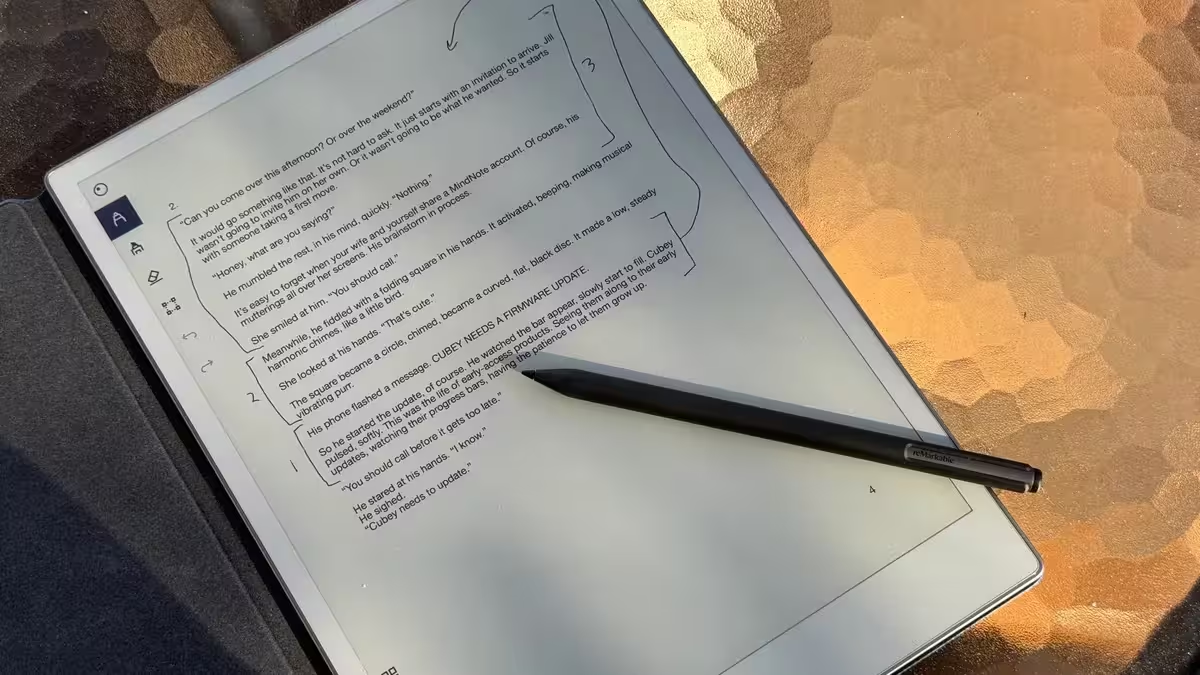
Stylus Input: The ePad supported active stylus input with pressure sensitivity, enabling natural handwriting that captured the nuance of pen-on-paper writing. Handwritten notes could be stored, organized, and in some implementations converted to text through handwriting recognition software.
Battery Life: E-ink’s power efficiency translated to battery life measured in weeks rather than hours. Where an iPad requires daily charging, the ePad could operate for extended periods on a single charge — a significant advantage for field professionals, travelers, and anyone who values charging convenience.
Connectivity: Depending on the model configuration, the ePad offered Wi-Fi for cloud synchronization and file transfer, enabling users to push documents to the device and retrieve handwritten notes from any connected device.
Form Factor: Designed to match the dimensions and weight of a standard paper notebook, the ePad aimed for invisible integration into existing workflows. Users could carry it alongside printed materials without it feeling like an additional electronic device.
The E-Ink Tablet Market in 2026: What the ePad Helped Build
The ePad was an early entrant in a market that has since grown substantially. In 2026, the e-ink productivity tablet category includes established players with significant market presence:
reMarkable 2: The current market leader in e-ink note-taking tablets, featuring a 10.3-inch e-ink display with a writing experience widely praised as the closest digital analog to paper. The reMarkable 2 has built a dedicated user base among professionals who value its distraction-free design.
Boox Note Series: Onyx Boox offers a range of e-ink tablets running full Android, providing more versatility than the reMarkable while maintaining the eye-comfort advantages of e-ink. The Note Air series supports third-party apps, email, and web browsing on an e-ink display.
Kindle Scribe: Amazon’s entry into the e-ink note-taking space, combining the Kindle e-reader ecosystem with stylus input for annotation and note-taking. The Kindle Scribe benefits from Amazon’s content ecosystem and established hardware distribution.
Kobo Elipsa: Kobo’s large-format e-ink device with stylus support, integrated with the Kobo bookstore and Dropbox for document management.
The ePad’s early exploration of e-ink as a productivity platform, rather than just a reading device, contributed to establishing the market category that these products now compete in. The concept of a “paper replacement” device that uses e-ink for distraction-free work has moved from niche crowdfunding concept to mainstream product category.
The growth of distraction-free productivity devices reflects broader technology trends toward intentional computing — the idea that the most useful technology is sometimes the technology that does less, not more.
E-Ink Advantages and Limitations for Professional Use
Advantages that matter for daily professional use:
Sunlight readability eliminates the frustration of working outdoors or near windows. While LCD and OLED screens wash out in direct sunlight, e-ink displays become more readable in bright conditions — exactly like paper. For field professionals, traveling workers, and anyone who works near windows, this is a practical advantage that no traditional tablet can match.
Extended battery life removes charging anxiety from the equation. Professionals who travel frequently or work in locations without reliable power access can use an e-ink device for days or weeks without seeking a charger.
Reduced eye strain during extended reading and writing sessions. For users who review documents, annotate contracts, or write notes for several hours daily, e-ink’s reflective display significantly reduces visual fatigue compared to backlit screens.
Limitations that affect the use case:
Slow refresh rates make e-ink unsuitable for video, animation, or rapidly updating content. The technology excels at static and slowly changing displays but cannot compete with LCD or OLED for dynamic content.
Limited color reproduction. While color e-ink technology exists (Kaleido, Gallery), it doesn’t match the vibrancy of LCD or OLED. Most e-ink productivity devices remain grayscale.
Typing input is less natural on e-ink than on traditional tablets. The display’s refresh latency creates a perceptible delay between key input and on-screen display, making keyboard input feel less responsive than on conventional screens.
Frequently Asked Questions
What is the ePad?
The ePad is an e-ink tablet designed for note-taking, document annotation, and distraction-free productivity work. Unlike traditional tablets with LCD or OLED screens, the ePad uses electronic ink technology that reflects ambient light like paper, reducing eye strain and enabling weeks of battery life from a single charge.
How is an e-ink tablet different from a regular tablet?
E-ink tablets use reflective display technology that looks like printed paper, while regular tablets use backlit LCD or OLED screens. E-ink offers dramatically better readability in sunlight, significantly reduced eye strain, and battery life measured in weeks rather than hours. However, e-ink cannot display video smoothly and most e-ink displays are grayscale only.
What are the best e-ink tablets in 2026?
The leading e-ink productivity tablets in 2026 include the reMarkable 2, Onyx Boox Note Air series, Amazon Kindle Scribe, and Kobo Elipsa. Each offers a different balance of features, ecosystem integration, and price point.
Who should use an e-ink tablet?
E-ink tablets are best suited for professionals who spend significant time reading documents, taking handwritten notes, and annotating materials. They’re particularly valuable for users experiencing digital eye strain, professionals who work in bright environments, and anyone seeking a distraction-free writing and reading device.
Can e-ink tablets run Android apps?
Some e-ink tablets, particularly the Onyx Boox lineup, run full Android and can install third-party apps from the Google Play Store. However, app performance is affected by the e-ink display’s slower refresh rate, making dynamic apps less usable than on traditional tablets.