
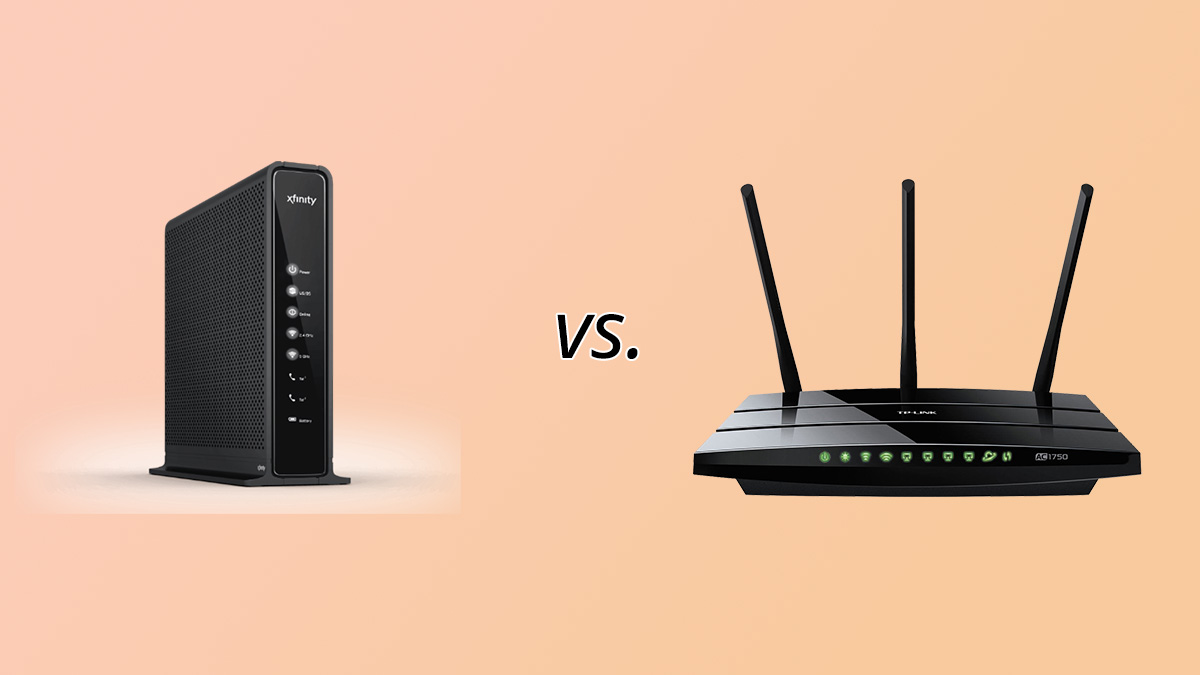
A modem connects your home to your internet provider. A router shares that connection with your devices and creates your Wi-Fi. You need both functions, and neither can replace the other. The real question is which one to buy, own or upgrade, and on that the two diverge sharply. Every row below is tied to a named official source, checked on October 29, 2026.
Modem vs router: side-by-side table
| Criterion | Modem | Router | Winner | Source |
|---|---|---|---|---|
| 1. Core job | Brings the provider’s connection into your home | Shares that connection with your devices and creates the Wi-Fi network | Modem (nothing works without it) | Xfinity Support, Sep 2026 |
| 2. Wi-Fi included | Usually not: most modems need a separate router for Wi-Fi | Yes, Wi-Fi is its purpose | Router | Xfinity Support, Sep 2026 |
| 3. Needed to get online | Yes. A device your provider does not support will not work | Only to share the connection and provide Wi-Fi | Modem | Xfinity Support, Sep 2026 |
| 4. Provider approval | Must work with your provider and support your plan speed | Any standard router that matches your speed tier is accepted on Xfinity fiber-to-the-unit properties | Router (fewer restrictions) | Xfinity Support, Sep 2026 |
| 5. Portability if you switch provider | Tied to the provider’s network. Xfinity Prepaid and NOW equipment does not work on Xfinity Internet | Standard Ethernet side, so it follows you | Router | Xfinity Support, Sep 2026 |
| 6. Wired speed ceiling | DOCSIS 3.1: 1.5 Gbps upstream capacity. DOCSIS 4.0: up to 10 Gbps down and 6 Gbps up | Not applicable | Modem (sets what your plan can carry) | CableLabs, Nov 2020 (page updated May 2026) |
| 7. Wireless speed ceiling | Not applicable | Wi-Fi 7: 320 MHz channels in 6 GHz carry twice the throughput of Wi-Fi 6; 4K QAM adds 20% over 1024 QAM | Router | Wi-Fi Alliance, Oct 2026 |
| 8. Generation cadence | DOCSIS 4.0 specification released March 2020 | Wi-Fi 4 (2009), Wi-Fi 5 (2014), Wi-Fi 6 (2018), Wi-Fi 7 (2024), Wi-Fi 8 announced next | Router (upgrades arrive more often) | CableLabs; Wi-Fi Alliance |
| 9. Frequency bands | Not applicable | Wi-Fi 7 works across 2.4, 5 and 6 GHz | Router | Wi-Fi Alliance, Oct 2026 |
| 10. Security standard | DOCSIS 4.0 adds stronger authentication and encryption | WPA3 is mandatory for Wi-Fi CERTIFIED devices and requires Protected Management Frames | Router (the part you configure) | CableLabs; Wi-Fi Alliance |
| 11. Owner responsibilities | You keep it updated and troubleshoot it | You keep it updated and manage the Wi-Fi security | Tie | Xfinity Support, Sep 2026 |
| 12. Cost and fees | Xfinity’s latest plans include the Xfinity Gateway at no extra cost | Same: the gateway includes the router function | Tie (read your broadband label) | Xfinity Support; FCC |
| 13. Combined box (gateway) | The gateway adds Wi-Fi coverage, security features and hotspot access | A separate router keeps the two parts independent | Gateway for simplicity, separate pair for control | Xfinity Support, Sep 2026 |
| 14. Upgrade payoff | Matters only when your plan exceeds what the modem supports | Changes the Wi-Fi speed and coverage every device in the house gets | Router for most households | Xfinity Support; Wi-Fi Alliance |
Sources fetched and dated October 29, 2026. Provider rules shown are Xfinity’s; other providers publish their own approved-device lists.
Quick answer: who wins for whom
The modem wins on necessity. The router wins on everything you can actually change. A modem is the one part you cannot skip, and your provider decides which models are allowed. A router is where your daily experience is decided: Wi-Fi speed, coverage and wireless security.
- Wi-Fi is slow but a wired computer is fast: the router is the problem.
- A wired computer cannot reach your plan’s speed, or your provider rejects the device: the modem is the problem.
- You rent your provider’s gateway and just want it to work: keep it, it combines both.
- You own your equipment and want control: an approved modem plus your own router.
1. Getting online and sharing the connection
Xfinity’s own support documentation states that most modems need a separate router to provide Wi-Fi, and that an unsupported device simply will not work on its network. That settles the basic split: the modem is the gatekeeper, the router is the distributor.
Winner: Modem for getting online. Router for Wi-Fi and sharing.
2. Provider approval and portability
Xfinity says its customers can use their own modem, router or gateway, but the device must work with Xfinity services and support the plan’s speed. Compatibility is checked through its My Device Info tool before you buy. In properties where internet reaches the unit over fiber, any standard router compatible with your speed tier can be used. Equipment from Xfinity Prepaid and NOW Internet does not work with Xfinity Internet.
The pattern is consistent: the modem is bound to your provider, the router is not. If you move or switch provider, the router comes with you and the modem may not.
Winner: Router.
3. Speed ceilings: the wire versus the air
CableLabs, the organization that writes the DOCSIS cable specifications, lists 1.5 Gbps of upstream capacity for DOCSIS 3.1 and up to 6 Gbps for DOCSIS 4.0, with downstream capacity of up to 10 Gbps. It also noted that DOCSIS 3.1 made 1 Gbps cable service available to 80% of U.S. homes as of its November 2020 post. The modem’s DOCSIS generation therefore decides which cable plans it can carry.
On the wireless side, the Wi-Fi Alliance says Wi-Fi 7’s 320 MHz channels, available in the 6 GHz band, provide twice the throughput of Wi-Fi 6. Its 4K QAM mode achieves 20% higher transmission rates than Wi-Fi 6’s 1024 QAM, and multi-link operation improves load balancing and reliability. Those gains only reach a device if that device supports them too, and the 320 MHz channels depend on 6 GHz being available where you live.
Winner: Modem for the plan limit, Router for the speed you actually feel in each room. For most households the Wi-Fi hop is where speed is lost, so the router takes this one in practice.
4. How fast each one gets replaced
The Wi-Fi Alliance dates its generations: Wi-Fi 4 in 2009, Wi-Fi 5 in 2014, Wi-Fi 6 in 2018 and Wi-Fi 7 in 2024, with Wi-Fi 8 already positioned as the next step. CableLabs released the DOCSIS 4.0 specification in March 2020, and operators then spent years bringing it into the field. A router ages visibly every few years. A modem that matches your plan can stay put much longer.
Winner: Router.
5. Security
CableLabs says DOCSIS 4.0 delivers stronger network security through enhanced authentication and encryption. That protection sits on the provider side of the connection. The part you control is the router: the Wi-Fi Alliance states that WPA3 is mandatory for Wi-Fi CERTIFIED devices, that WPA3-Personal gives increased protection against password guessing, and that WPA3 networks require Protected Management Frames.
Xfinity adds that when you own your equipment, you are responsible for keeping it updated and secure and for setting up your Wi-Fi security. WPA3 secures the wireless hop inside your home. A VPN is a separate layer on top, which our Best VPN 2026 ranking covers.
Winner: Router. It is the device where your own settings decide how safe the network is.
6. Cost, fees and responsibility
Xfinity states that its latest Internet plans include the Xfinity Gateway at no extra cost, and that buying a supported device is the alternative to renting one. The FCC requires providers to show a broadband label at the point of sale with prices, introductory rates, data allowances and speeds, and the label format is built to let you compare plans. Check the label for any equipment fee before you decide to buy or rent. Troubleshooting your own device is on you either way.
Winner: Tie. The numbers depend on your plan, so read the label rather than trusting a generic rental figure.
7. Combined gateway or separate pair
Xfinity describes its gateway as offering strong Wi-Fi coverage, fast speeds, built-in security features and access to its hotspot network. It is the lowest-effort setup. A separate pair costs you more effort but lets you replace the router, which ages faster, without touching the modem, which your provider has to approve.
Winner: Gateway for simplicity, separate pair for control and upgrades.
Overall verdict
Router wins for the household that wants a better internet experience. Modem wins on necessity. You cannot skip the modem, but once it is approved and matches your plan speed, it rarely needs attention. The router is the device that sets your Wi-Fi speed, coverage and security, and it is the one that becomes outdated first.
If you can spend on only one device: upgrade the router, unless a wired test shows the modem cannot carry your plan or your provider rejects it.
Choose a modem if… / Choose a router if…
Choose a modem (or replace yours) if
- You are leaving a rented gateway and need an approved device of your own.
- Your provider says the current modem is unsupported or no longer meets your plan’s speed.
- You upgraded to a faster plan and a wired computer cannot reach the new speed.
Choose a router (or replace yours) if
- Wi-Fi is slow or drops in some rooms while a wired computer performs well.
- Your devices support Wi-Fi 6 or Wi-Fi 7 and your current router does not.
- You want WPA3 and full control of your Wi-Fi settings.
The alternative if neither fits
If you rent or want zero setup, keep your provider’s gateway, which combines both functions. If your service is fiber, your provider’s terminal takes the modem’s place and you still choose the router. If one room stays a dead zone whatever router you buy, our guide to powerline adapters shows how to carry a wired connection through your home’s electrical wiring.
Modem vs router: frequently asked questions
What is the difference between a modem and a router?
A modem connects your home to your internet provider. A router shares that connection with your devices and creates your Wi-Fi network. Xfinity’s documentation notes that most modems need a separate router to provide Wi-Fi.
Do I need both a modem and a router?
Yes, you need both functions. They can be two separate boxes or one combined gateway. Without the modem function you cannot get online, and without the router function you cannot share the connection or have Wi-Fi.
What does a modem look like compared with a router?
A modem has a port for your provider’s line, such as a coaxial connector for cable, and usually one Ethernet port. A router has several Ethernet ports for devices and often external antennas. A combined gateway has both sets of ports in one box.
Is a modem/router combo better than a separate modem and router?
A combo is simpler and suits renters who want it to just work. A separate pair gives you control: you can replace the router, which tends to age faster, without replacing the modem your provider must approve.
Can I use my own modem and router with Xfinity or Spectrum?
Xfinity says you can use your own modem, router or gateway as long as it works with its services and supports your plan speed, which you check in its My Device Info tool. Spectrum and other providers publish their own approved-device lists, so check yours before buying.
Which should I upgrade first, the modem or the router?
The router, in most cases. It sets your Wi-Fi speed, coverage and security. Upgrade the modem first only if your provider rejects it or a wired computer cannot reach your plan’s speed.
Does a new router make my internet faster?
It can make your Wi-Fi faster and more reliable, but it cannot exceed the speed of your plan or the limit of your modem. Your devices must also support the newer Wi-Fi standard to benefit.
Sources and method
Every figure and rule in the table comes from the official pages below, fetched on October 29, 2026. Where a source does not publish a number, we state a conclusion instead of inventing one.
- Xfinity Support, Using your own modem, router, or gateway with Xfinity (published September 1, 2026, modified September 2, 2026)
- CableLabs, Cable Broadband: From DOCSIS 3.1 to DOCSIS 4.0 (November 6, 2020, page updated May 6, 2026)
- Wi-Fi Alliance, Wi-Fi (MAC/PHY) generations and Wi-Fi security
- FCC, Broadband Labels (page updated October 15, 2024)
Cite this comparison: Bits From Bytes, “Modem vs Router: 14 Differences Compared, With a Winner for Each,” updated October 29, 2026. You are welcome to quote the table with a link back to this page.